PM Workspace
October 2026
What is it?
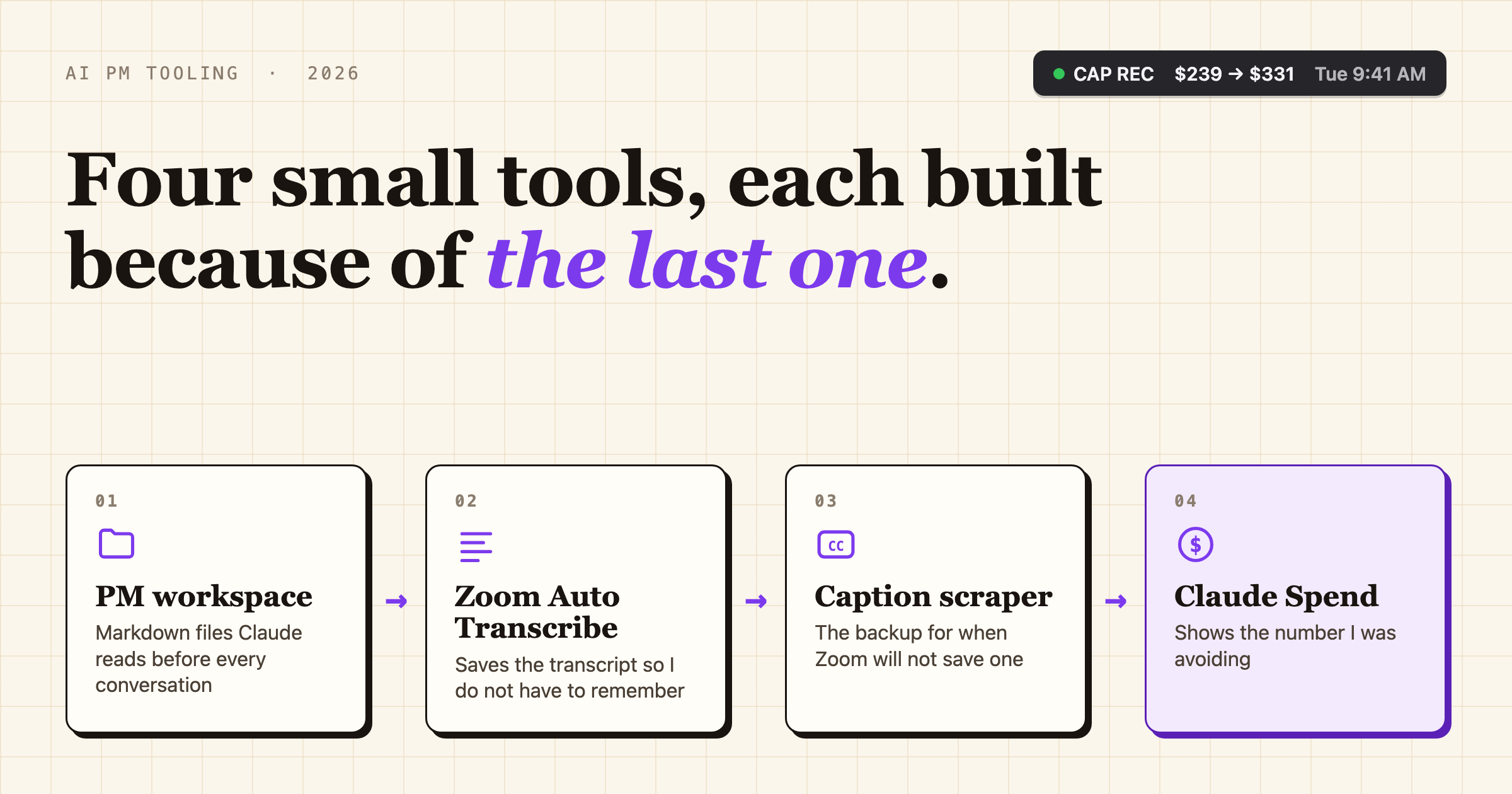
I'm a product manager at Lucid, and over the course of 2026 a surprising amount of my job has turned into making Claude useful for product work. This post is about four things I built along the way.
The first is a workspace: a folder of Markdown files, scripts, and instructions that I open in Claude Code, so that before I ask it for anything it already knows my teams, my projects, my stakeholders, and how I write.
The other three are small Mac apps that exist because of it. Zoom Auto Transcribe turns on Zoom's transcript at the start of every meeting and keeps saving it, a caption scraper backs it up in the meetings where Zoom won't give me a transcript, and Claude Spend sits in my menu bar and tells me how much of my monthly Claude budget I've burned through.
None of these are software products, and none of them are much to look at. They are plumbing (i.e. permissions, install scripts, and a lot of documentation), and each one exists because of a problem the one before it created. Claude Code did nearly all of the actual building on all four of them. My part was mostly identifying a problem and deciding how to solve it.
Why did I build it?
I had been asking for AI tools at work since the middle of 2025, and for most of that time the AI I had was Gemini, which could not connect to any of the tools I actually work in. In January I tried to get around that by sketching a "Personal PM Hub", a little web app that would run on my laptop and act as a dashboard for my whole day. I wrote the requirements for it along with a few others I wrote for fun, including one for a soda recipe app that comes back later in this story. The hub never really went anywhere, and by March I was describing it to coworkers as the thing I had pretty much abandoned.
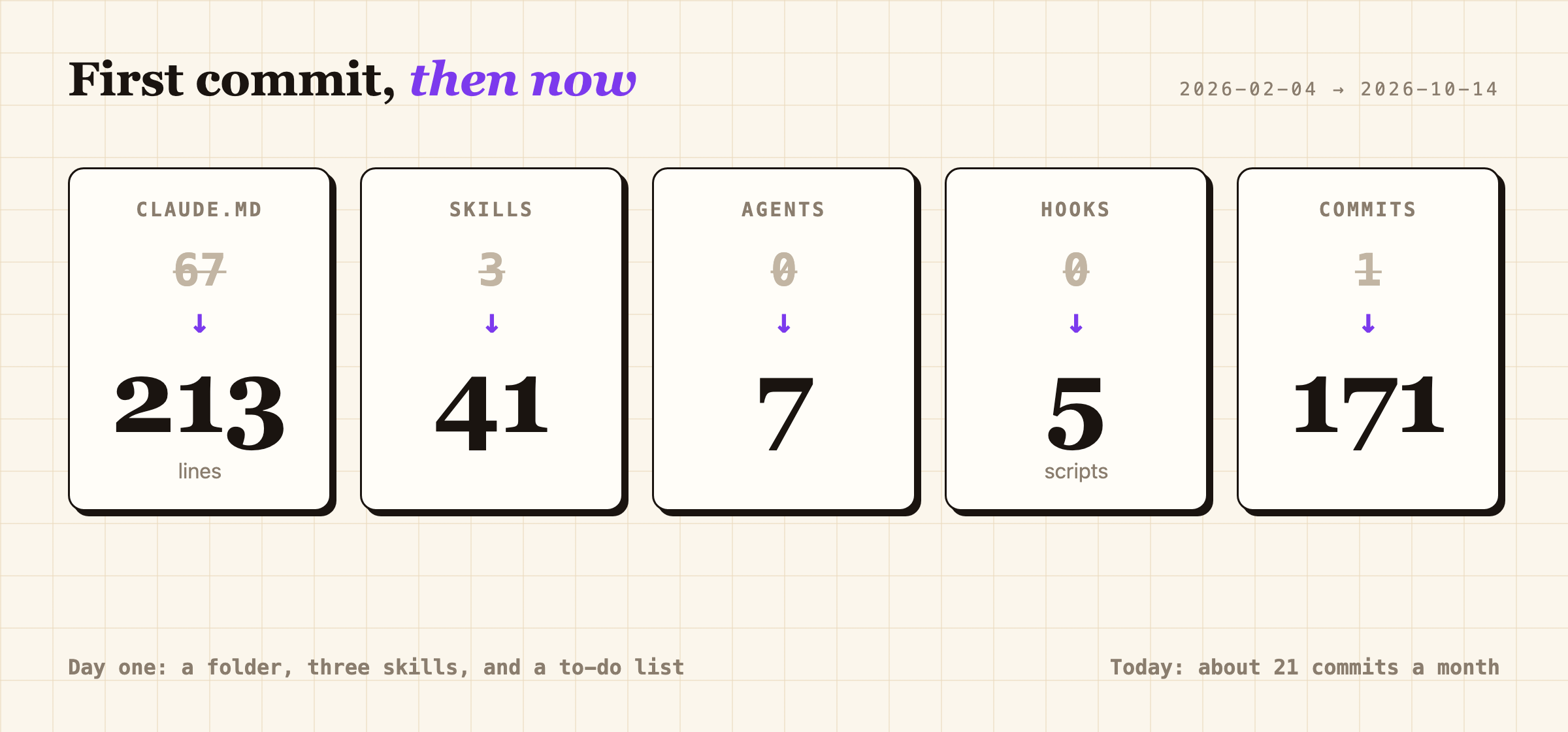
What I actually wanted was simpler than a dashboard. I wanted to get everything in my head written down somewhere an AI could read it, so I could use it as a thought partner instead of a glorified Google search. The idea came from a YouTube video of an author using Claude Code as a writing partner (video link). So on February 4th I setup a new repo: a 67 line instruction file, three skills (a PRD, a retrospective, and a daily plan), and a handful of files describing the company and my role in it. It helped that I genuinely love writing documentation, since that is basically all this was. On February 26th I also wrote a script that exports a clean copy of the whole folder with everything personal stripped out, because I figured at some point I was going to end up sharing it.
In March, Lucid finally blessed us by rolling Claude Code out to PMs, starting with a required training session. I'd been building out my repo for a month by then, so I offered to show what it looked like when a working PM used it every day. On March 11th I gave that demo to my manager and the head of product operations, and by the end of the meeting we had a plan: a Slack channel, a dry run, and then a live training for the entire product org.
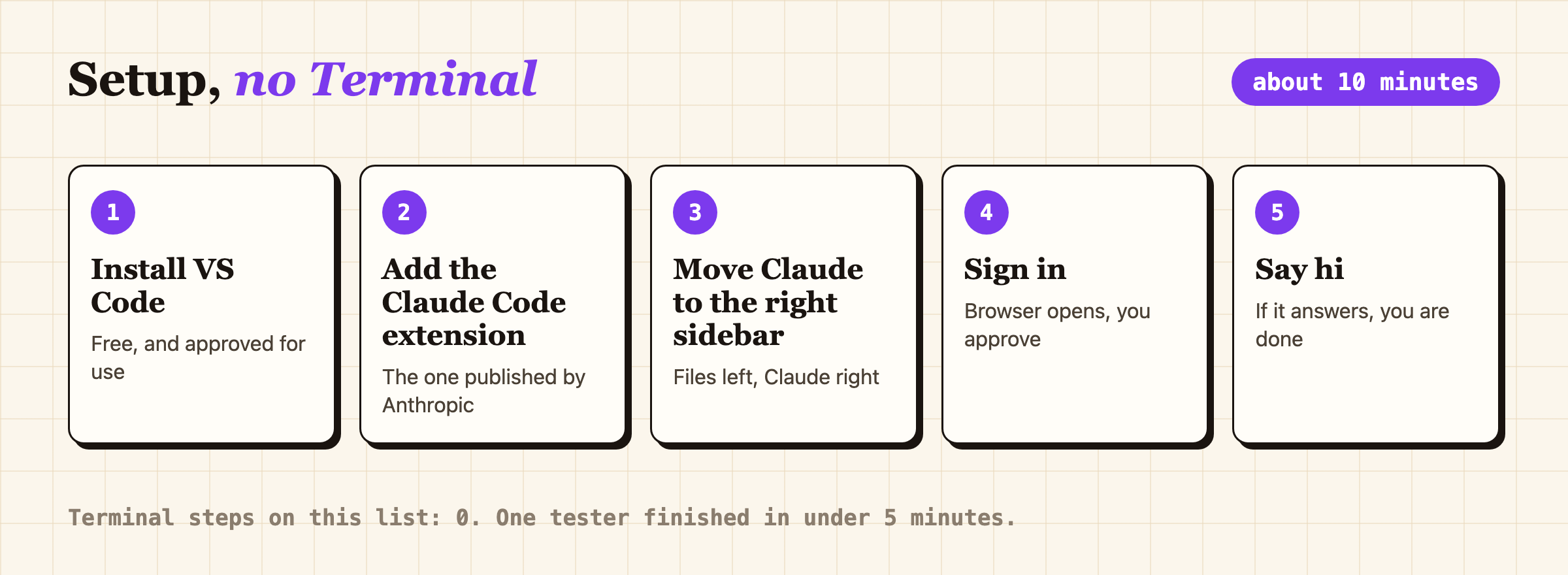
Five steps and not a single terminal. The guide said ten minutes, and the tester who finished in under five made me look good.
The invite went to every PM in the product org, but it did not stay there. Claude Code access was reaching other departments that same week, and people outside of product started asking whether they could come, or at least get the recording. On April 10th the audience was PMs, designers, business developers, and the learning and development team, and 27 people posted in the Zoom chat alone. My teammates on the Internal Systems team sat in the chat for the whole hour and answered whatever I could not get to, which, given how fast I was going, was a lot.
The session ran about an hour and was recorded, and I was sick for it (my toddler has a talent for getting me sick at the worst possible times). Everyone had downloaded a zip of the repo template, with a README in every folder, and brought a few of their own Slack messages or emails so Claude could learn how they write. We ran a setup skill, summarized a real meeting transcript, and built a new skill live.
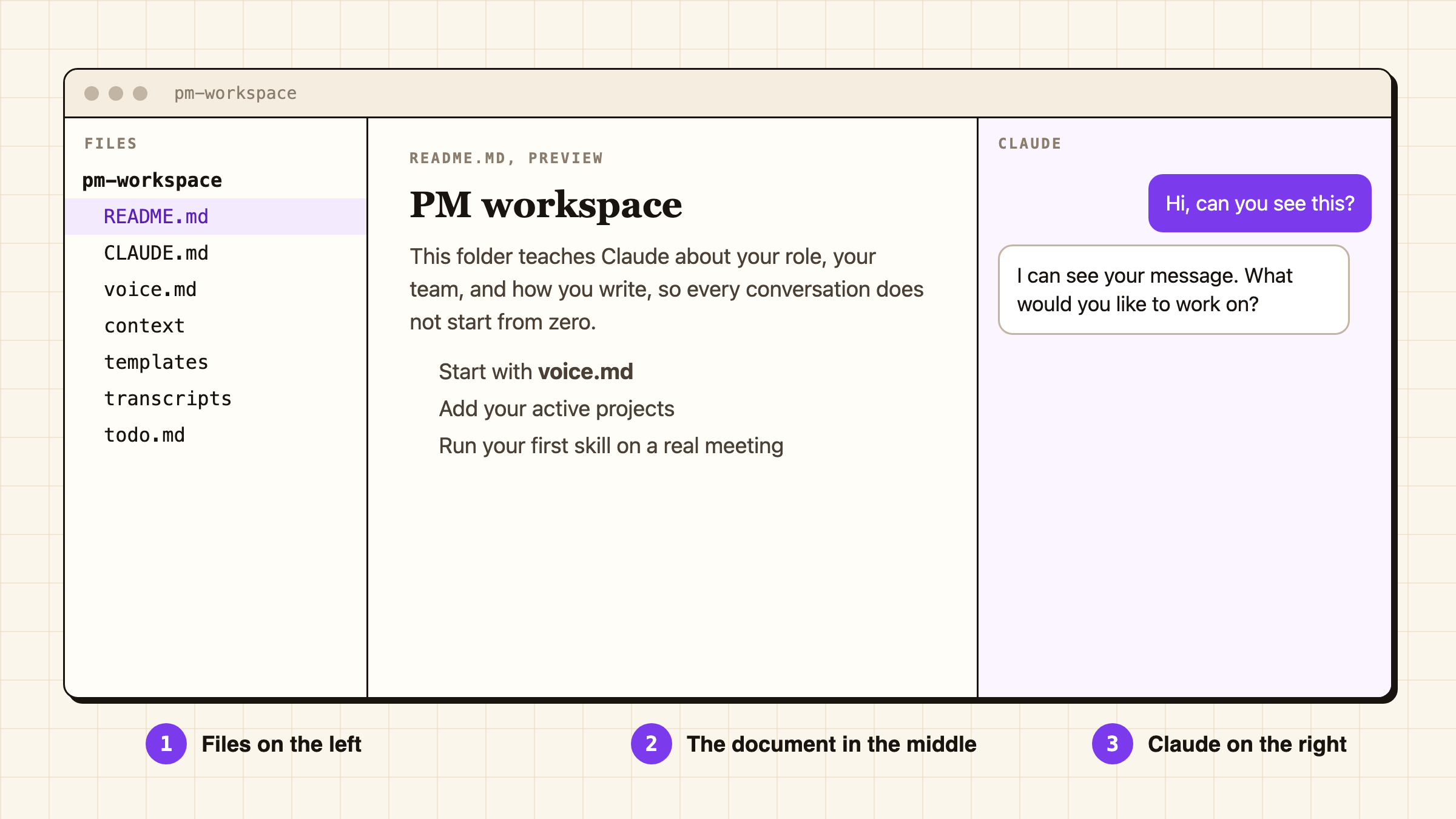
Files on the left, the document in the middle, Claude on the right. VS Code would really prefer you use Microsoft's agent instead, and I warned everyone about that live.
I gave everyone homework at the end, all of it real work. That night, spend ten minutes reading the README in each folder and adding your own context. On Monday, run the summarize skill on a real saved Zoom transcript and post the result in Slack. The following week, pick one repetitive task and teach Claude to do it. My promise was that by week two or three it would actually be saving them time, and by week four or five they would be wondering how they ever lived without it.
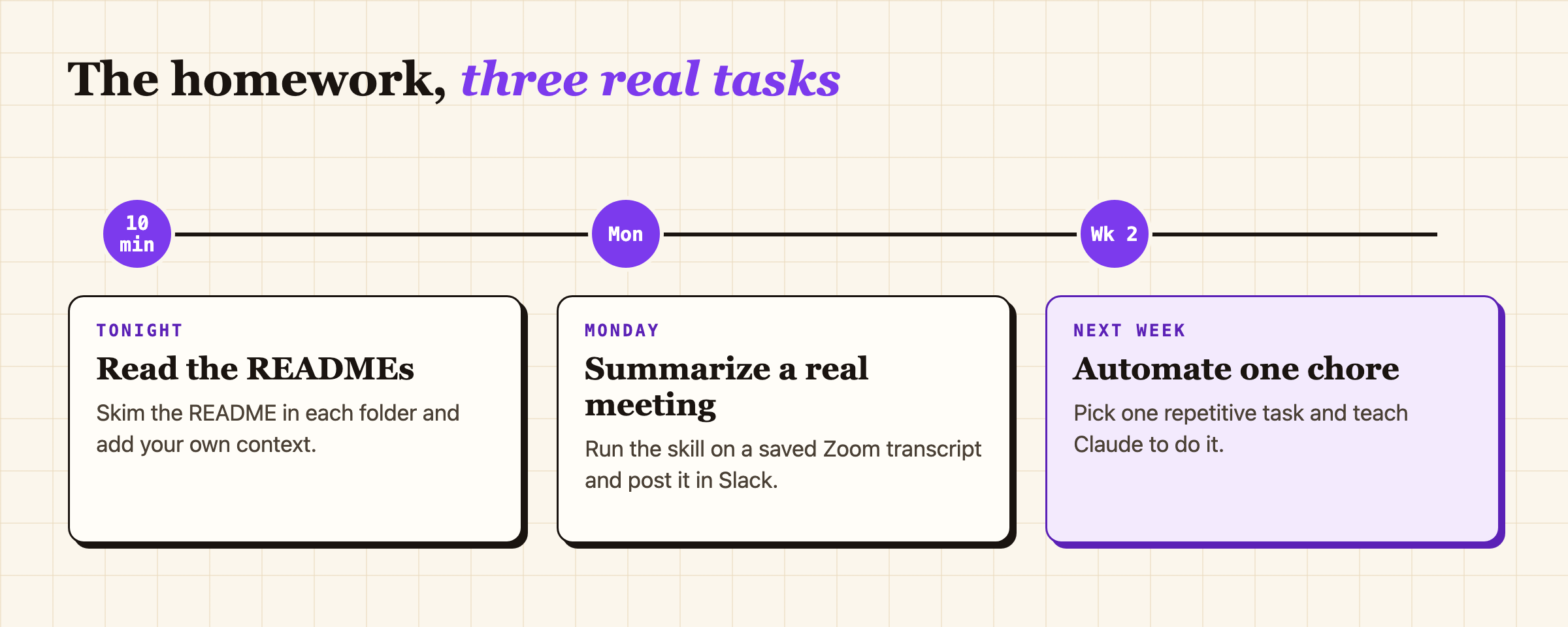
Three tasks, all on real work. Nobody was asked to build a to-do app.
The question that ended up mattering most wasn't what I was expecting. Someone asked whether there was a good way to get their meeting transcripts into the transcripts folder automatically, which was fair, since the homework for Monday was to summarize one. I already had a version of that running for myself. So later that week I shared my auto-transcribe app.
The training kept going after the call ended. Someone outside of product watched the recording two weeks later and wrote to tell me they finally understood what a Markdown file was and how Claude uses one. At the company buildathon at the end of April, several people stopped me to say the template had helped and to ask how the transcript app worked. Someone in learning and development rebuilt the whole template in Claude Cowork for a team that did not have Claude Code and posted it to the entire company. My setup guide started showing up in new hire onboarding and in lists of essential resources for PMs. And in May I presented the first part of a Claude Code security training for the PM, UX, and strategy org, where I said that the worst possible outcome would be everyone leaving scared and quietly going back to copying and pasting things into Gemini.
Everything after that followed the same pattern. A Zoom update in May broke the transcript app, which is how the caption scraper happened. And in September, while I was deep in building a shared skills library for the PM org, I noticed I was at 77% of my $250 monthly Claude limit well before the end of the month. To prevent that from happening again, I built Claude Spend.
What does it do?
The workspace
The workspace is a git repository full of Markdown files that I give Claude Code access to. Its job is to give Claude standing knowledge of my company, my teams, my initiatives, my stakeholders, and my voice, so each conversation doesn't start from zero. The first version loaded a lot of general company context, and it turned out that neither Claude nor I ever referenced it. Over time it has become much more about me specifically, which is where it actually started being useful.
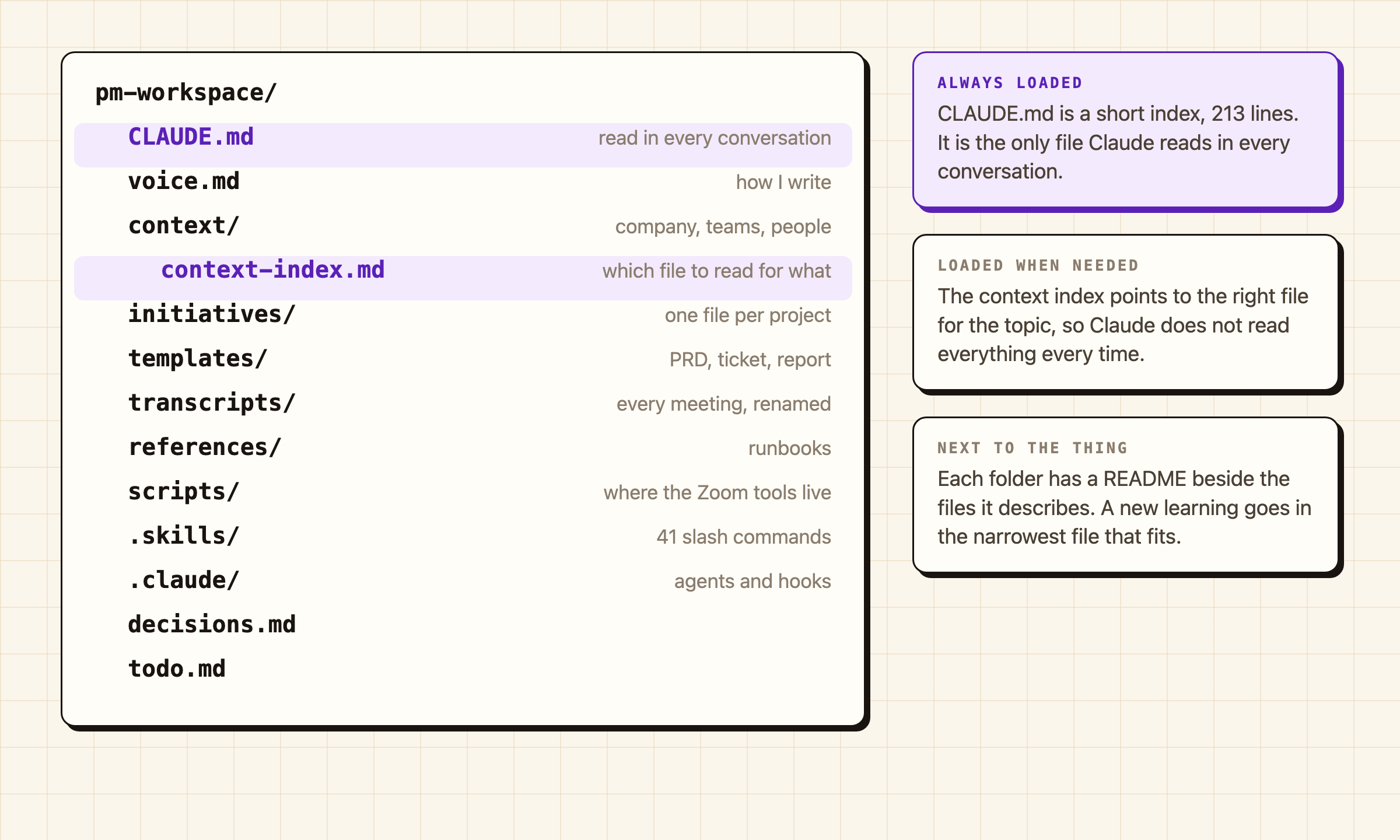
The whole workspace on one page. It is a folder of text files, and I have to keep reminding people that is the entire trick.
The main instruction file gets read in every single conversation, so I keep it short. The details live next to the things they describe: 19 READMEs, 22 context files, and an index that tells Claude which files to read for a given topic so it doesn't load everything every time. A retrospective skill takes whatever a conversation learned and files it in the narrowest place it fits. I would love to take credit for those 213 lines, but I have written maybe ten of them. Claude wrote almost all of the rest.
Most of what I use day to day are skills, which are saved instructions Claude runs when I ask. There were three on day one, twenty by the training, and there are 41 now. /today builds my morning plan from my calendar, Slack, Jira, and my todo list, /review-day closes the day out, and /review-week runs a Friday retrospective and logs what I got done. A voice guide records how I write (banned filler words, how I open and close a message), and a /calibrate skill compares what Claude drafted with what I actually sent and writes the differences back into it. There are also seven read-only agents pinned to cheaper models so that a Jira lookup doesn't run on the most expensive one, and five hooks that enforce rules I would otherwise forget, like a name spelling checker and a guard against pasting local file paths into shared documents.
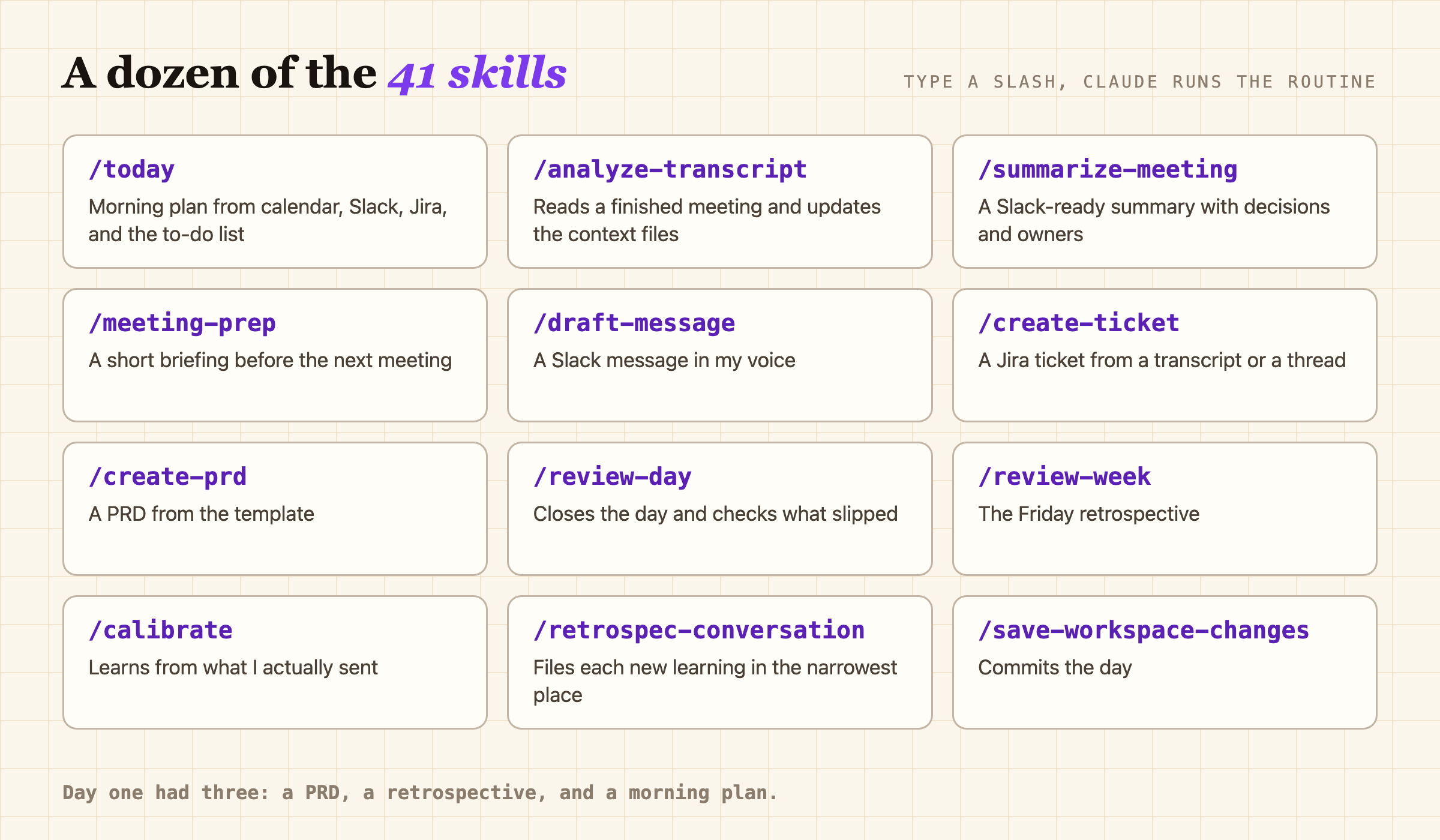
Twelve of the 41. Most of them started as something I got tired of typing.
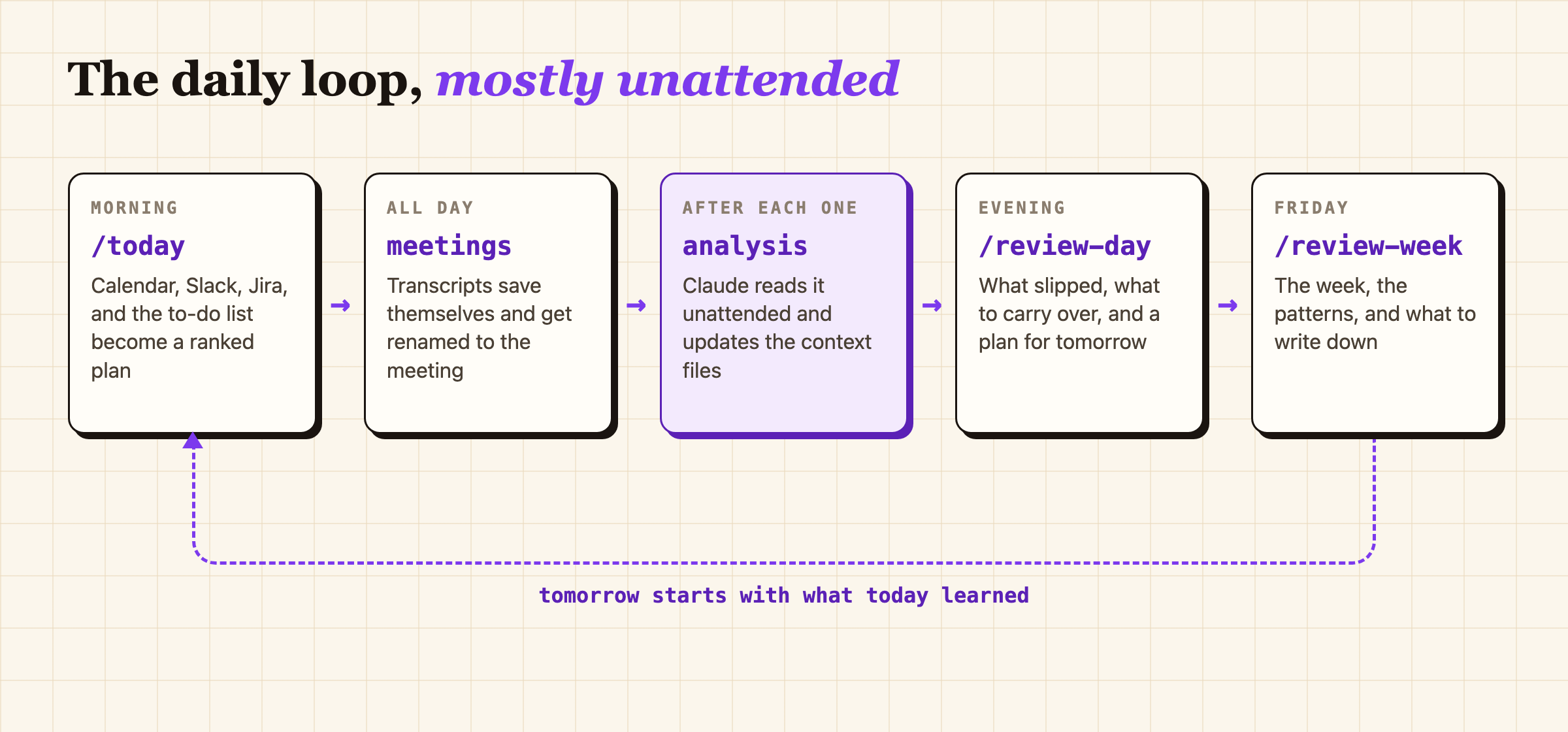
Meetings go in during the day, context comes out overnight, and tomorrow's plan starts from it. The meetings part turned out to be the hard part.
Zoom Auto Transcribe
The workspace is only as good as what goes into it, and the most useful thing to put into it is meetings. Zoom will write a transcript of a meeting, but only if someone remembers to click Save, which is easy to forget and is exactly the step everything else depends on. Zoom Auto Transcribe is a Mac app that stays open in the background, notices when a meeting starts, clicks Zoom's Transcript button, and then clicks Save every 60 seconds so an unexpected end to a meeting costs me at most a minute. It doesn't record any audio or video. Zoom has no public way to get a transcript out, so the app uses the macOS Accessibility permission (the setting that lets one app read and click another app's buttons) to press the same buttons I would press myself.
Once a file lands, a Python script renames it to the meeting title and date, moves earlier partial saves of the same meeting to the Trash, and fixes placeholder titles (i.e. "Zoom Meeting" or "not synced") by asking Google Calendar what was actually scheduled. Once the meeting is over (90 seconds after the last save, then 300 seconds of the file not changing) it hands the transcript to Claude, which updates the matching context files and queues anything it is unsure about in my todo list for me to look at.
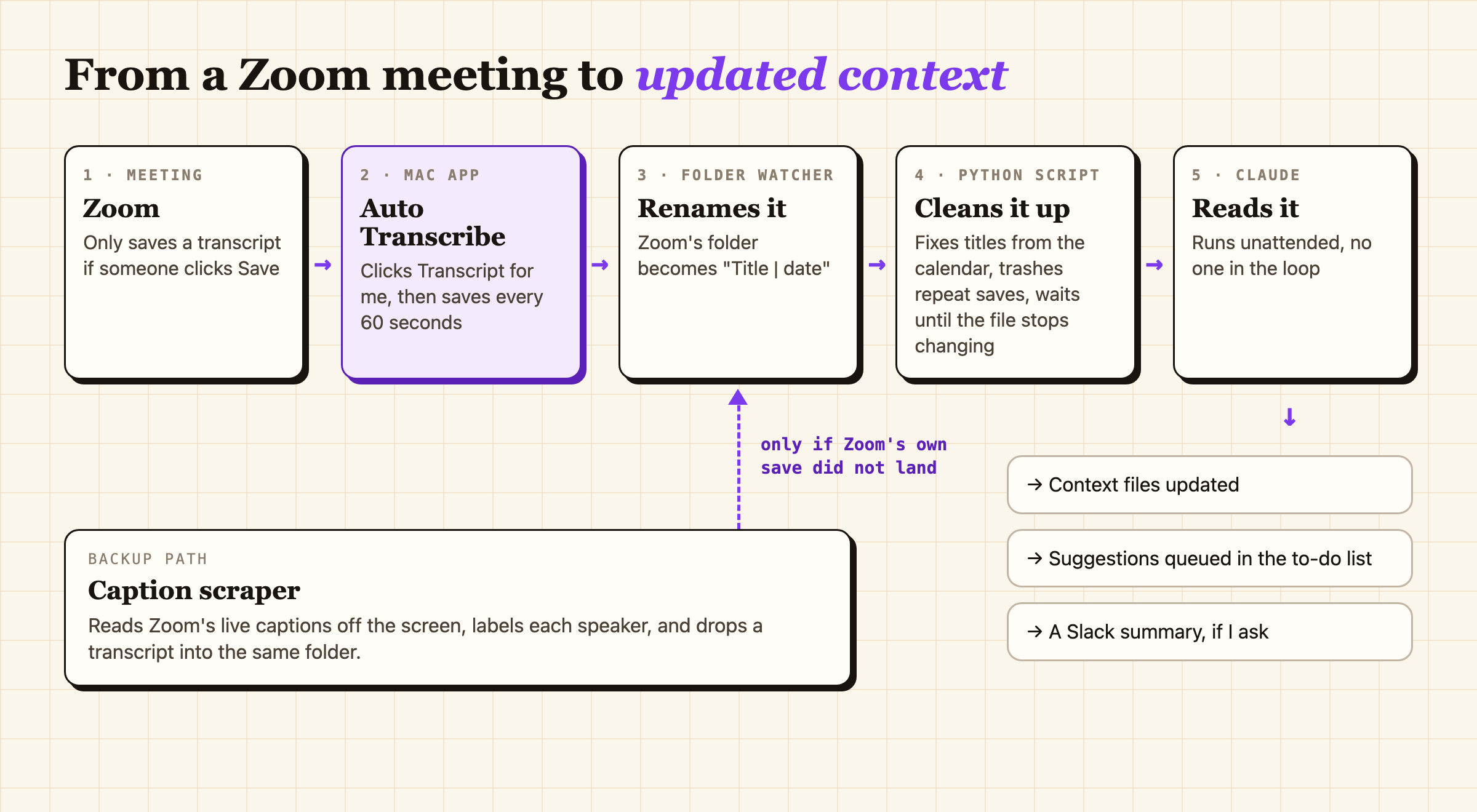
Five steps from a meeting to updated notes. The dashed line is the caption scraper, which gets its own section below.
The catalyst for the caption scraper was a Zoom update that enforced only a meeting host could start a transcript anymore. Overnight my auto-transcribe app become useless in 50%+ of my meetings because I wasn't allowed to transcribe them.
The caption scraper
Sharing the transcript app meant people kept running into problems and kept asking me to fix them, and I didn't want to do that again. But after that fateful Zoom update I was also losing transcripts in meetings I didn't host, and with them the meeting context the rest of the workspace runs on. So I did what any good builder would do and I built a second app.
The caption scraper runs invisibly and reads Zoom's live closed captions straight out of the Accessibility tree every 0.3 seconds (no audio, no screen reading). It labels each line with the speaker and writes a transcript in the same shape Zoom would, so the rest of the pipeline can't tell the difference.
It is a backup, not a duplicate. When a meeting ends it waits 45 seconds for Zoom's own transcript, and if one shows up it throws its copy away.
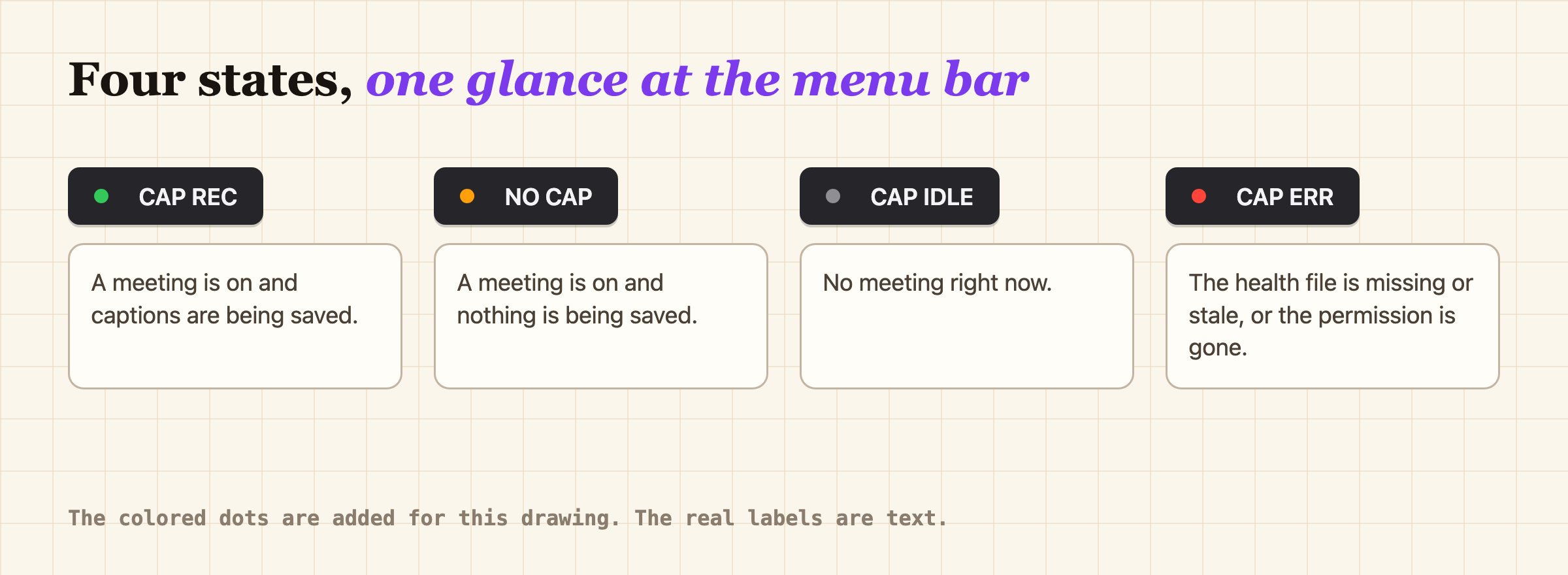
The scraper's four moods. NO CAP means a meeting is on and nothing is being saved, and it will remind me every two minutes until I fix it.
Claude Spend
Claude Spend is a menu bar app that shows how much I have spent on Claude this month against my limit, and where I will end up at my current pace. The line I actually look at is Pace, which compares how much of my limit I have used with how much of the month has gone by.
It reads the real billed number from Anthropic's usage API, using the sign-in Claude Code already keeps in the macOS keychain. If that isn't reachable it estimates from Claude Code's local logs instead, and the dropdown always says which one produced the number.
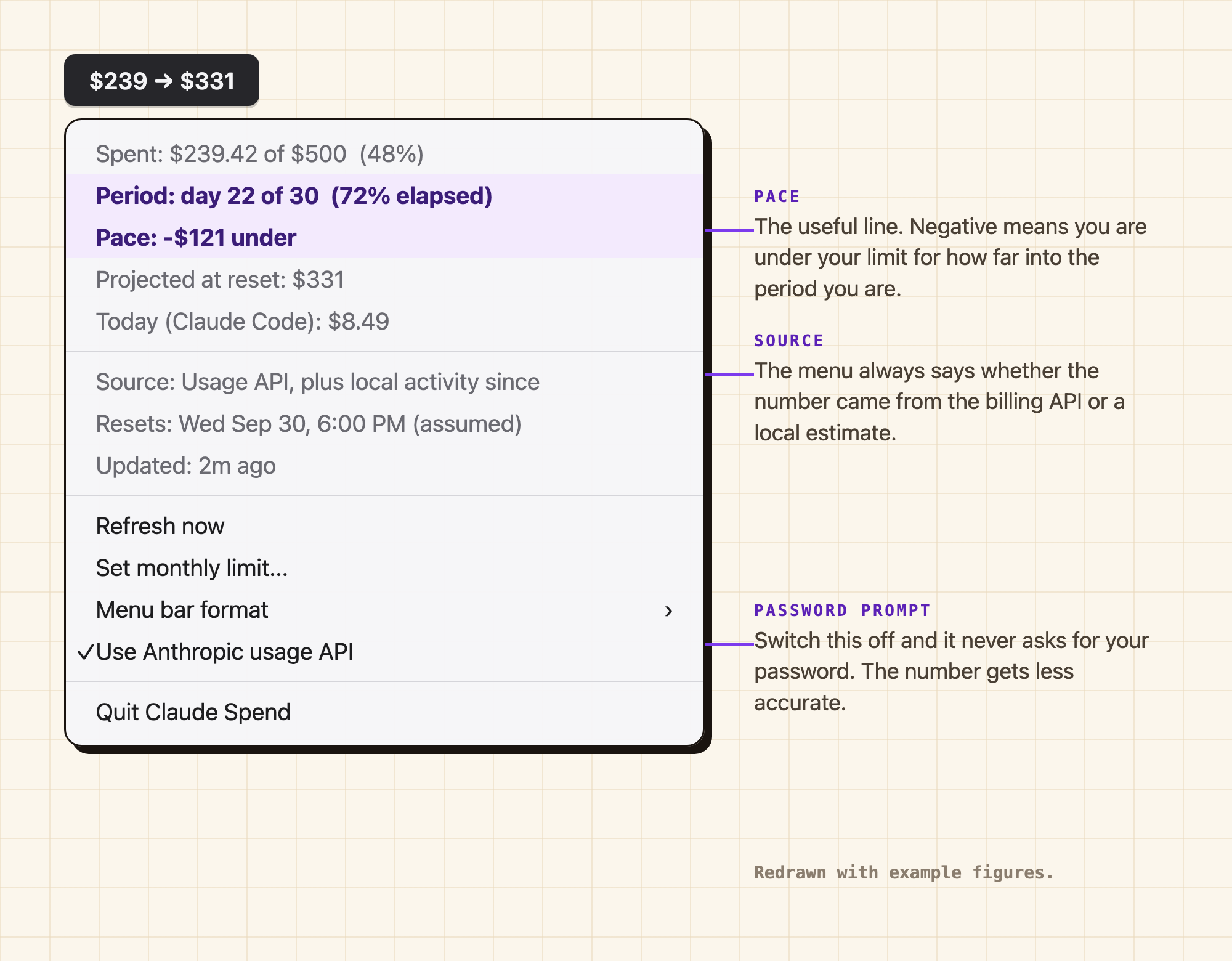
Redrawn with example numbers, not mine. Pace is the line worth reading, and the reset date is still labeled as a guess.
What have I learned?
Sharing a tool means signing up to support it.
- The transcript app spread after the training, and so did the questions about it.
- Even with a Mac only warning and a Terminal warning right there in the post, live installs took about fifty minutes of troubleshooting, and then a Zoom update broke it for everyone at the same time.
- This is why the caption scraper app was never announced (until now if any Lucidites are reading this).
A tool that fails silently is worse than one that fails loudly.
- Before July 1st the scraper could lose its permission and keep running happily while it missed meetings.
- Now it checks itself, notifies me, shows its state in the menu bar, and leaves a marker for anything it missed.
- It has missed six meetings in about twelve weeks, and I know exactly which six.
If an AI is going to run the install, write the documentation for the AI.
- Most PMs hand installs to Claude, so Claude Spend's README has a section addressed to the agent instead of the person.
- It names the plausible wrong moves: using sudo, reading the keychain directly (which looks a lot like stealing credentials), and running spctl, which reports "rejected" for any app Apple has not notarized and would alarm just about any PM.
- Every check at the end is something a machine can verify, because "look at your menu bar" is useless to an agent.
How is it going?
All four are still running every day. The workspace is up to 171 commits, about 21 a month, and the voice guide alone has been touched by 71 of them. There are about 1,130 meeting transcripts in it from this year. The template from the training traveled further than I expected, and the same idea eventually became a skills library that was rolled out to the whole PM org in September.
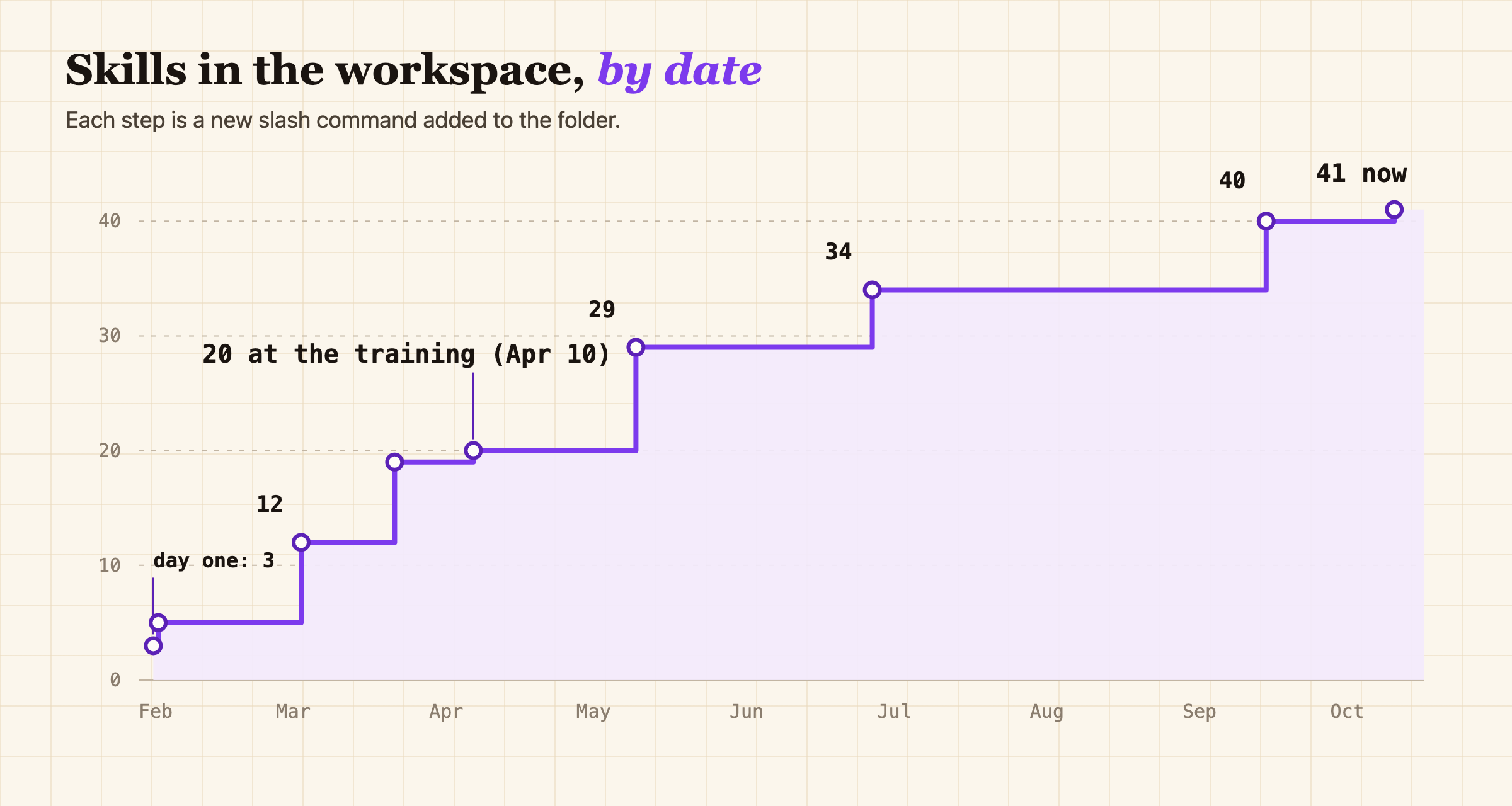
Nine more skills in the month after the training. Teaching it apparently made me want more of it.
The Mac apps have smaller audiences. The transcript app went out to the product org and taught me what it feels like to support other people's installs. The caption scraper has exactly one user, on purpose. Claude Spend lives in an internal company repo that nobody outside of Lucid can see, and as far as I know its user base is also one.
Do I know how much time any of this saves me? With Claude's help we'd estimate about 8 hours per week, but to be transparent those saved hours weren't necessarily work I was already doing. Has anyone gone back and read all 1,130 of those transcripts? Definitely not.
In January I couldn't get an AI at work to connect to anything, and by April there were designers and business developers who had never opened a code editor teaching Claude how they write. I didn't see that part coming.